
Quick Verdict
This BrowserAgent review covers everything you need to know before you buy — features, pricing, real performance, and how it compares to the competition.
Most AI automation tools charge per run. BrowserAgent flips that model entirely. It runs AI agents locally inside your Chrome browser at a fixed monthly price, which means unlimited executions with no API meter running in the background.
BrowserAgent is a no-code workflow builder that chains LLM calls, conditional logic, and browser actions into reusable agents. It ships as a Chrome extension and a web dashboard.
The core appeal is simple: build a workflow once, run it as many times as you want for the same monthly fee.
It landed in the top three on Product Hunt on launch day and has grown to over 5,000 Chrome extension users with a 4.8-star rating.
For knowledge workers who repeat the same web tasks daily — scraping, summarizing, exporting, form-filling — that proposition is genuinely compelling.
Best for: Marketers, founders, recruiters, and operations teams who need browser automation without writing code or paying per run.
Not ideal for: Developers needing deep programmatic control, or teams requiring SOC 2-certified enterprise infrastructure at scale.
Try BrowserAgent for $37 — One-Time Price, No Monthly Fees
What Is BrowserAgent?
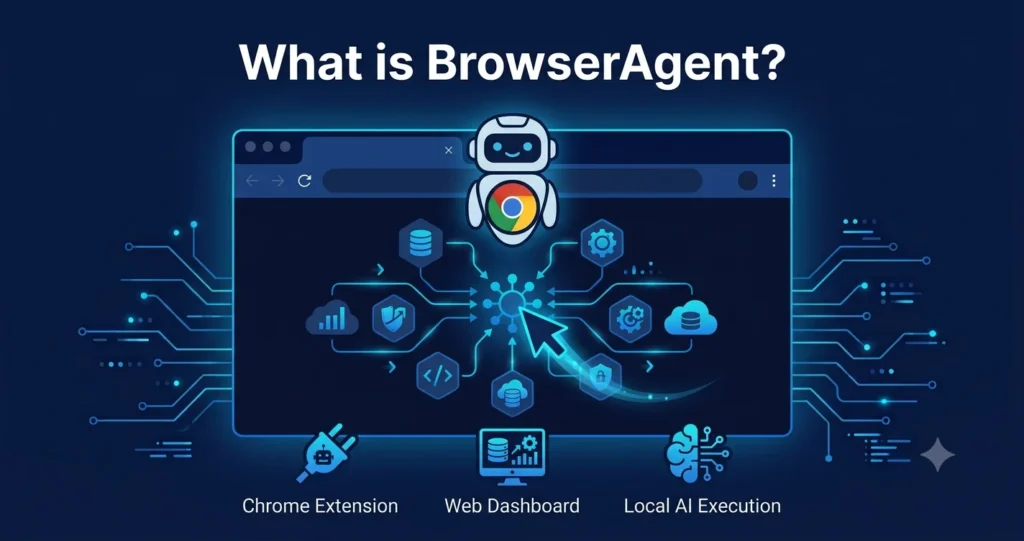
BrowserAgent is a browser-native AI automation platform built by the team at cloudcode.ai. It lets you build custom AI agents that work directly inside your active Chrome session — no cloud handoff required for execution.
The tool ships in two parts. First, a Chrome extension that embeds itself in your toolbar, so you can launch or edit a workflow without leaving the current page.
Second, a web dashboard where you design workflows visually, chain nodes together, and manage your agent library.
Its makers position it as an “automation command center” for people who hate repetitive web tasks but don’t want to write Playwright or Selenium scripts.
The local execution model is what separates it from most competitors: when an agent runs, it uses WebGPU and on-device processing rather than sending every interaction to a cloud server.
There is also a hybrid compute option.
Tasks that exceed what the local model handles spill over to cloud LLMs, then fall back to WebGPU for privacy when possible.
The extension captures page text automatically, cutting down the copy-paste friction that plagues most automation tools.
Key Features of BrowserAgent
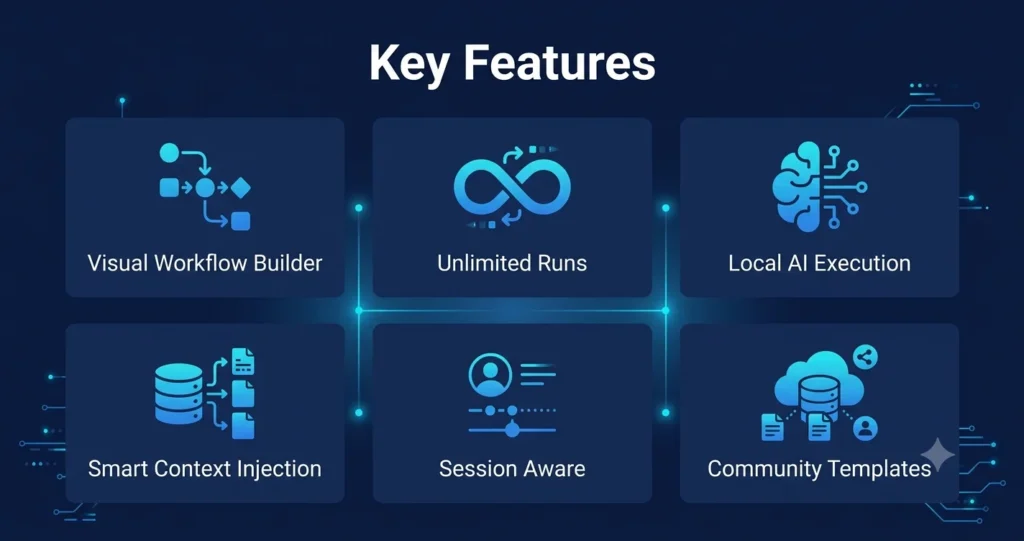
Visual No-Code Workflow Builder
You connect nodes visually: LLM calls, conditional branches, browser actions, and output steps. Once the flow is wired up, you hit Run and the agent scrolls, clicks, and extracts in real time inside your current browser tab.
The drag-and-drop editor means no Python, no Playwright, no developer dependency. Marketing and ops teams can build and iterate their own agents without filing a ticket.
Local AI Execution with Unlimited Runs
BrowserAgent’s most talked-about feature is its execution model. Agents run on-device using WebGPU, so there is no per-run API fee.
The fixed monthly price covers unlimited executions. For teams that found a valuable automation and then watched costs spiral, this is a meaningful structural difference.
Hybrid Compute: Local + Cloud Fallback
When a task needs more reasoning power than the local model provides, BrowserAgent offloads to cloud LLMs and then falls back to local processing when the task allows it.
This keeps the balance between cost, privacy, and capability without forcing you to choose one permanently.
Smart Context Injection
The extension reads the text of the current page and injects it automatically into the agent’s context. You don’t need to copy content manually before running a workflow. This makes it practical for tasks like “summarize this thread” or “extract all prices from this page.”
Community Workflow Templates
Pre-built agent templates for common use cases — “LinkedIn Company Analyzer,” “Email Thread Summarizer,” and others — let new users reach productive automation within minutes of installing the extension. Templates reduce the learning curve significantly for non-technical users.
Session-Aware Operation
Because BrowserAgent runs inside your active Chrome session, it works with any site where you’re already logged in, including proprietary internal tools that have no public API. There is no need to hand over credentials or configure OAuth integrations.
Chrome Extension + Web Dashboard
The extension handles execution; the dashboard handles design. You can switch between the two. Editing a workflow mid-task takes a click from the toolbar icon.
The dashboard stores your full agent library, so workflows are reusable across sessions.
BrowserAgent Pros and Cons
| Pros | Cons |
|---|---|
| Unlimited executions at a fixed monthly price | Free tier caps cloud calls at 50 per month |
| No-code visual workflow builder | Chrome-only — no Firefox, Safari, or Edge support |
| Runs locally — no cloud API costs during execution | Local AI model is less capable than GPT-4 or Claude 4 on complex reasoning tasks |
| Works inside your active session — no credential sharing | LinkedIn and similar platforms may flag agent activity as bot behavior |
| Community templates cut onboarding time | Limited enterprise security features compared to SOC 2-certified competitors |
| Smart context injection removes copy-paste friction | Complex multi-step workflows may need manual debugging |
| Strong Product Hunt debut; active early community | Relatively new product — feature roadmap still maturing |
BrowserAgent Pricing: All Plans Explained
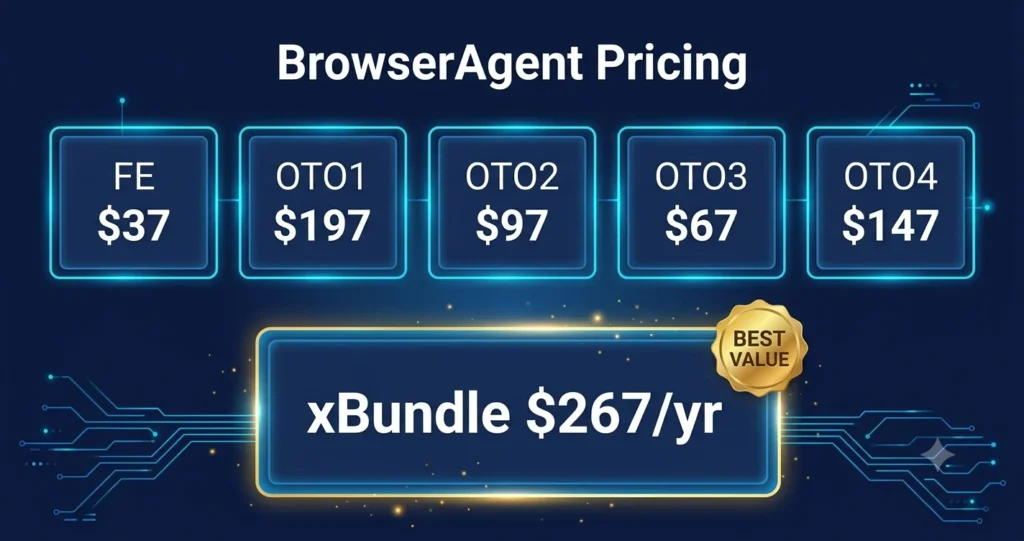
BrowserAgent uses a one-time purchase model on the front-end, with optional upgrades for agencies and power users. There are no monthly fees on the core product.
Here is every plan in the funnel, what it includes, and who it is for.
| Plan | Price | Best For |
|---|---|---|
| FE: BrowserAgent | $37 one-time | Beginners and solo users |
| OTO 1: DFY Empire | $197 one-time | Users who want everything set up for them |
| OTO 2: Agency Pro | $97 one-time | Freelancers and agency owners |
| OTO 3: ChainBuilder Pro | $67 one-time | Users who want multi-step automated workflows |
| OTO 4: Unlimited Ghost | $147 one-time | Power users and high-volume agencies |
| Bundle (xBundle: FE + OTO 2–4 + Bonuses) | $317/yr ($267/yr with coupon BROWSE) | Anyone who wants the full stack at the best price |
FE: BrowserAgent – $37 (One-Time)
The core product. For $37, you get a fully hosted AI agent that takes over a real Chromium browser, clicks, types, scrolls, fills forms, and delivers results you can sell. No monthly fees, no API keys, no credits.
- AI browser agent with live browser feed — watch every action happen in real time
- Pre-built money missions: local lead gen, cold outreach, SEO audits, social posting, affiliate articles, and more
- RepeatEngine Scheduler — run any mission on a daily, weekly, or hourly autopilot
- Browser Profile Manager with AES-256 encrypted login storage
- Export results to CSV, Excel, and Google Sheets
- 12 months of cloud hosting included — runs on BrowserAgent’s servers, not your computer
- Commercial rights included — every output is yours to sell
- 14-day money-back guarantee
Who it’s for: Anyone starting out. Solo operators, marketers, freelancers, and side-income seekers who want AI to handle real browser work without writing a single line of code.
OTO 1: DFY Empire – $197 (One-Time)
Done-for-you setup for buyers who want results from day one, not a learning curve. The BrowserAgent team builds your first 30 days of missions and hands you everything pre-configured.
- First 10 client missions pre-configured inside your dashboard — ready to run on day one
- 90 hand-picked target lists across local, e-commerce, and agency niches
- DFY cold outreach scripts and email sequences for each niche
- DFY client proposals and pricing templates for the top BrowserAgent service offerings
- 14-day money-back guarantee
Who it’s for: Buyers who want the fastest path to their first paying client. If you would rather deploy than learn, this removes every setup step.
OTO 2: Agency Pro – $97 (One-Time)
Turns BrowserAgent into a full client-facing agency platform. You get white-label controls, client sub-accounts, and branded reports — so your clients see your agency name, not BrowserAgent’s.
- Full commercial license to resell every BrowserAgent mission as your own service
- 25 client sub-accounts with separate logins for each client
- White-label dashboard — your agency branding replaces BrowserAgent’s
- Agency client management tools, separate workspaces, and branded reports
- Charge clients $500 to $2,000 per month for services the AI delivers
- 14-day money-back guarantee
Who it’s for: Freelancers and agency owners who want to resell BrowserAgent’s output under their own brand without the client ever knowing which tool runs in the background.
OTO 3: ChainBuilder Pro – $67 (One-Time)
A visual drag-and-drop workflow builder that chains multiple missions together. The output of one mission becomes the input of the next — full multi-step processes automated end-to-end.
- Visual chain builder — drag, drop, and connect missions without writing code
- 100 pre-built chains across the top use cases (lead scraper → enricher → email writer → sender as one workflow)
- Multi-step agency processes automated from start to finish
- 14-day money-back guarantee
Who it’s for: Users who run complex, multi-step workflows and want the entire process to run automatically in sequence, not one mission at a time.
OTO 4: Unlimited Ghost – $147 (One-Time)
Removes every cap and adds stealth, parallelism, and full API access. Built for power users and high-volume agencies running missions around the clock.
- 10 AI workers running missions in parallel — the front-end limits parallel mission count
- 24/7 cloud execution — missions run while you sleep
- Ghost Mode — stealth browsing for sites that normally detect and block bots
- Full API access — plug BrowserAgent into your own tools, dashboards, and workflows
- 14-day money-back guarantee
Who it’s for: Agencies and power users who need always-on infrastructure, parallel execution, and the ability to connect BrowserAgent to their existing tech stack.
Bundle: xBundle (FE + OTO 2 + OTO 3 + OTO 4 + Bonuses) – $317 one time ($317 with coupon “BROWSE”)
The best-value option in the funnel. xBundle bundles the core product plus OTO 2, OTO 3, and OTO 4, adds premium access to three bonus apps (AIOffices, AgencyReel, and LocalBizAI), and includes four exclusive xBundle bonuses — all for less than buying the OTOs separately.
- Everything in the FE BrowserAgent
- Everything in OTO 2 (Agency Pro), OTO 3 (ChainBuilder Pro), and OTO 4 (Unlimited Ghost)
- Premium access to AIOffices, AgencyReel, and LocalBizAI bundled in
- Priority render servers, extended AI credits, VIP setup concierge, and founding member badge
- Annual recurring — renews each year, full stack stays active
- Use coupon code “BROWSE” at checkout to drop the price from $317/yr to $267/yr
- 14-day money-back guarantee on every product
Who it’s for: Anyone serious about using BrowserAgent for client work or their own business at scale. The OTOs alone retail at $311 combined. xBundle saves over $40 on top of that and adds three premium app accesses. At $267/yr with the coupon, it is the obvious choice if you plan to use more than the core product.
Quick tip: OTO 1 (DFY Empire) is sold separately and is not included in the xBundle. If you want the done-for-you setup alongside the full stack, you will need to add OTO 1 separately for $197.
Check https://digitalbloggingonline.com/go/browseragent/ for current pricing, as plans evolve regularly for the product at this stage.
Get xBundle for $267/yr (Use Coupon: BROWSE)
BrowserAgent Performance Review
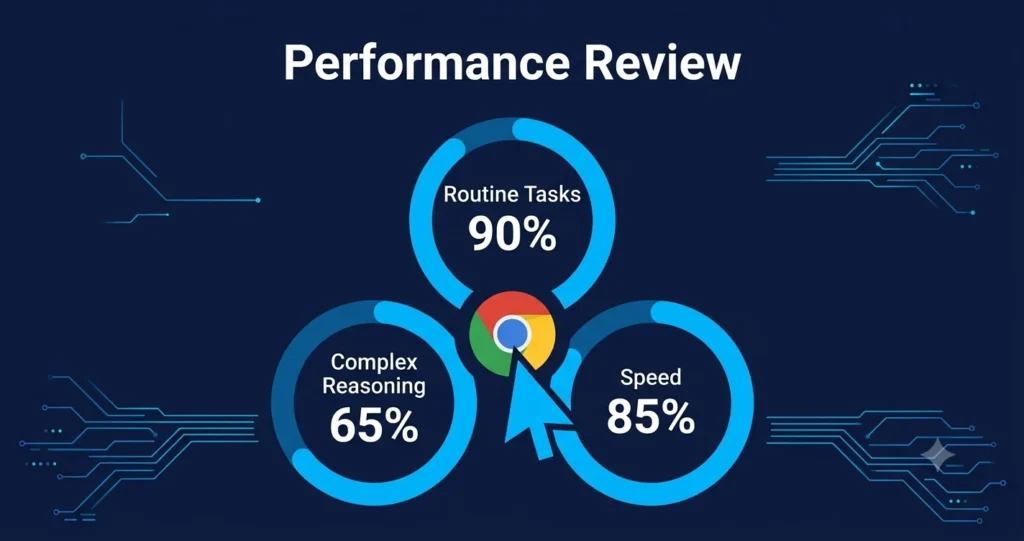
Task Completion on Routine Web Work
BrowserAgent performs reliably on the tasks it was built for: extracting structured data from pages you’re already viewing, summarizing long threads, and filling repetitive forms inside your active session.
The session-aware architecture is its strongest advantage here. Logged-in state, cookies, and local storage are all available to the agent without any configuration.
Users report that it handles data extraction tasks well on standard web apps.
A recruiter exporting LinkedIn company data or a marketer pulling pricing from competitor pages will find it dependable for those use cases.
Complex Reasoning Limitations
The local model is not equivalent to GPT-4o or Claude 4 on tasks that require deep multi-step reasoning. If your workflow needs the agent to make nuanced judgments, interpret ambiguous page structures, or handle unusual authentication flows, the cloud fallback kicks in — and the Free tier’s 50-call cap becomes a bottleneck fast.
Sites that actively detect bot behavior (LinkedIn being the most discussed example in early user feedback) can flag agent activity.
This is a broader challenge for all session-based automation tools, not unique to BrowserAgent, but worth knowing before you build LinkedIn workflows into your daily process.
Speed and Reliability
Local execution is fast for lightweight tasks. The hybrid model introduces some latency when cloud LLMs take over mid-workflow, but this is usually transparent to the user.
Debugging a failed workflow requires some manual review; the visual editor helps trace where a chain broke, though BrowserAgent does not yet offer the detailed session recordings that developer-focused tools like Browserbase provide.
Use Cases
- Competitive research: Extract pricing tables, feature lists, and product details from competitor pages into structured data without writing a scraper.
- Sales prospecting: Build workflows that pull company details, contact information, or job postings from sites where you’re logged in.
- Content summarization: Summarize long articles, email threads, or documentation pages with a single toolbar click.
- Form automation: Fill repetitive forms on internal tools, CRMs, or procurement portals using saved templates.
- Data export: Pull structured data from web apps that have no API or export feature and route it to a spreadsheet or dashboard.
- Recruitment research: Analyze company pages, job listings, and candidate profiles at scale.
- QA testing: Run basic functional checks on web apps by scripting agent walkthroughs of key user flows.
BrowserAgent Alternatives
Several tools compete in overlapping territory. Here is a clear breakdown of what each does better or worse than BrowserAgent.
- Browser Use (browseragent.dev): Open-source framework for developers. 89% WebVoyager benchmark score. More capable of complex tasks, but requires Python and LLM API keys. Costs scale with usage. SOC 2 Type 2 certified. Best for developers building custom agents.
- Skyvern: No-code enterprise browser automation with LLM + computer vision. Best for legacy portals and government forms. Stronger for teams needing repeatable workflows without developer resources.
- Perplexity Comet: Full AI-native browser with autonomous browsing for consumers. Free. Best for research-heavy work. Not a workflow builder.
- ChatGPT Atlas: AI browser from OpenAI built into every tab. Requires ChatGPT Plus ($20/month). macOS only. Best for ChatGPT-heavy workflows.
- Browserbase: Cloud infrastructure for developers deploying browser agents at scale. 50M+ sessions in 2025. Not a no-code tool — it is the backend layer that other agents run on.
- MultiOn: API-first browser automation for embedding in products. Developer-focused.
BrowserAgent vs. Competitors
| Feature | BrowserAgent | Browser Use | Skyvern | Perplexity Comet |
|---|---|---|---|---|
| No-code builder | Yes | No (Python) | Yes | No |
| Local execution | Yes | No (cloud/API) | No (cloud) | No (cloud) |
| Fixed pricing | Yes | Pay per API call | Subscription | Free |
| Session-aware (logged-in pages) | Yes | Yes | Yes | Yes |
| Benchmark task accuracy | Not published | 89% (WebVoyager) | 86% (WebVoyager) | Not published |
| Enterprise security (SOC 2) | No | Yes (Type 2) | Yes | No |
| Community templates | Yes | No | Yes | No |
| Target user | Knowledge workers | Developers | Enterprise ops teams | Consumers |
Who Should Use BrowserAgent?
BrowserAgent fits a specific user well: someone who does repetitive web tasks manually every day, doesn’t write code, and finds per-run API pricing unpredictable.
- Marketers who pull competitor pricing, extract product data, or summarize content at scale.
- Founders and solo operators who handle their own research and data gathering.
- Recruiters who analyze company profiles and job listings across multiple sites.
- Operations teams working in internal tools that have no API.
- Freelancers who want a predictable automation bill while building client workflows.
It is a harder sell for enterprise security teams that require SOC 2 certification, developers who want programmatic control and framework flexibility, or teams running hundreds of agent tasks per day against complex authentication flows.
Start Automating Your Browser Work Today — $37 One-Time
Tips for Better Results with BrowserAgent
- Start with community templates. Don’t build from scratch on your first day. Use a pre-built template close to your use case, then modify it. You’ll understand the node structure faster by editing than by starting blank.
- Keep workflows narrow. Agents that try to do too much in one run fail more often. Break a complex research task into 2 or 3 focused agents chained together rather than one giant workflow.
- Test on stable pages first. Sites that frequently change their layout (especially those with A/B tests running) will break workflows more often. Start with internal tools or pages you control.
- Watch your cloud call count on the Free tier. Workflows that involve multiple LLM reasoning steps per run will consume the 50-call monthly limit quickly. Upgrade before you build anything business-critical.
- Add a confirmation step before high-stakes actions. If your workflow submits forms, sends messages, or exports data to external systems, add a manual review node before the final action.
This prevents runaway automation from causing real problems. - Use context injection actively. The smart context injection is most useful when you’re on the page you want to act on. Navigate to the right page before triggering the agent, rather than asking the agent to navigate there.
Get BrowserAgent and Run Your First Mission Today →
Common Mistakes to Avoid
- Building LinkedIn workflows without caution. LinkedIn detects automated activity aggressively. Even session-based tools can trigger account warnings. Use BrowserAgent on LinkedIn sparingly and never at high volume.
- Expecting local AI to match GPT-4o. The on-device model is faster and cheaper, but it handles ambiguous or complex pages less reliably. For anything nuanced, accept that cloud fallback will happen and budget the calls accordingly.
- Treating benchmark scores as real-world guarantees. BrowserAgent hasn’t published WebVoyager scores. Even tools that score 89% on benchmarks often fail 30–50% on specific enterprise portals with custom authentication. Pilot your actual target sites before committing.
- Ignoring the Free tier cap. The 50 cloud calls per month sounds generous until you run a workflow that calls the LLM 5 times per page across 20 pages. That’s one day’s work.
- Running agents unsupervised on consequential tasks. Any workflow that changes data, sends messages, or triggers purchases needs a human checkpoint. Don’t set it and forget it for anything with real-world side effects.
BrowserAgent Review Frequently Asked Questions (FAQ)
What is BrowserAgent?
BrowserAgent is a no-code AI agent builder that runs inside your Chrome browser. It lets you chain LLM calls, conditional logic, and browser actions into reusable automated workflows. Because agents execute locally on your device, you pay a fixed monthly fee rather than per run.
Is BrowserAgent free to use?
Yes, there is a Free plan that allows unlimited local executions and up to 50 cloud LLM calls per month. The Free tier is enough for testing and occasional light use, but regular users will likely need a paid plan once they exceed the cloud call limit.
Does BrowserAgent require coding skills?
No. It is built for non-technical users. The visual workflow editor lets you connect nodes by dragging and dropping. You describe what you want in natural language, and the agent handles the browser actions.
No Python, no Playwright, no terminal.
How is BrowserAgent different from tools like Browser Use?
Browser Use is an open-source developer framework that requires Python and connects to paid LLM APIs — costs grow with usage. BrowserAgent is a no-code product with local execution and fixed pricing. Browser Use is more powerful for complex programmatic tasks; BrowserAgent is faster to get started for routine web automation.
Is my data private when using BrowserAgent?
Because agents run locally inside your active Chrome session, your browsing data does not route through BrowserAgent servers during execution. The Chrome extension developer has disclosed that user data is not sold to third parties. Tasks that fall back to cloud LLMs do send the relevant page content to those models, so review the privacy policy if you handle sensitive information.
Can BrowserAgent work on sites behind a login?
Yes. This is one of its key advantages. Because the agent runs inside your existing Chrome session, it has access to any site where you are already logged in — including internal tools that have no public API or automation support.
Does BrowserAgent work on LinkedIn?
It can, but with caveats. LinkedIn actively detects automated browser activity, and even session-based tools have triggered account warnings for some users. Use BrowserAgent on LinkedIn with low volumes and manual supervision. High-frequency LinkedIn automation carries real account risk.
What browsers does BrowserAgent support?
Currently, Chrome only. The Chrome Web Store extension is the primary installation method. Edge, Firefox, and Safari support is not yet available. If you use a non-Chrome browser primarily, this is a significant constraint.
How does BrowserAgent handle CAPTCHA?
BrowserAgent does not have a native CAPTCHA-solving layer, the way enterprise tools like Browser Use do. If an agent encounters a CAPTCHA mid-task, it will typically stall and require manual intervention. This limits its usefulness on sites that gate access with frequent CAPTCHA challenges.
What are the main alternatives to BrowserAgent?
For developers: Browser Use (open-source, Python, 89% benchmark accuracy). For no-code enterprise workflows: Skyvern. For consumer AI browsing: Perplexity Comet (free) or ChatGPT Atlas (requires ChatGPT Plus). For developer infrastructure: Browserbase. The right choice depends on your technical skill level, use case, and budget model.
Can BrowserAgent run 24/7 in the background?
No. Because it runs inside your active Chrome session, it requires the browser to be open and running. It is not a cloud agent that operates autonomously while your computer is off. For 24/7 unattended automation, you would need a cloud-based tool or a dedicated server setup.
Is BrowserAgent suitable for enterprise teams?
It depends on your requirements. For small teams doing routine web automation, it works well.
For enterprises needing SOC 2 certification, advanced audit logs, dedicated infrastructure, and compliance controls, tools like Browser Use (SOC 2 Type 2 as of October 2025) or Skyvern are better fits.
What makes BrowserAgent different from RPA tools like UiPath?
Traditional RPA tools use rule-based scripts that break when a website changes its layout or element names. BrowserAgent uses an LLM to reason about the page, so it can adapt when a site changes — recognizing a “Submit” button regardless of its CSS class name. This makes it more resilient for dynamic web pages.
How many users does BrowserAgent have?
The Chrome extension has over 2,000 installs on the Chrome Web Store as of the last update, with the Product Hunt community reporting 5,000+ users from launch-period activity. It holds a 5-star rating on the Chrome Web Store from early reviewers.
Where can I install BrowserAgent?
The Chrome extension is available on the Chrome Web Store, published by cloudcode.ai.
The web dashboard and pricing plans are accessible at browseragentai.com/sales.
Final Verdict
BrowserAgent solves a real problem. Per-execution pricing punishes success in AI automation — the more useful the workflow, the more it costs. Local execution with fixed pricing flips that model.
For knowledge workers who repeat the same web tasks daily and don’t write code, BrowserAgent is one of the most accessible entry points into AI automation available right now. Community templates shorten the ramp-up time. Session-aware operation removes credential friction. The visual editor puts workflow design in non-developer hands.
The trade-offs are real, too. Chrome-only limits reach. The local model is less capable than frontier LLMs on complex tasks. The Free tier’s 50-cloud-call cap is easy to hit.
And for enterprise teams with compliance requirements, more mature tools with SOC 2 certification are worth the premium.
If you run the same web tasks manually more than 3 times a week and you use Chrome, BrowserAgent is worth installing on the free tier this week. You’ll know within a few hours whether it replaces your current workflow or needs to be part of a larger stack.
Rating: 4.2 / 5 — Strong for non-technical users automating routine browser tasks. Limited for developers or enterprise deployments requiring deep control and compliance.
Get BrowserAgent for $37 — Commercial Rights Included
Get the Full xBundle Stack for $267/yr →
Read More Articles
OTalker AI Review 2026 — Real Test: Is It Worth Buying?
Best AI Video Tools in 2026: Top 10 Picks for Every Creator
Top 10 AI Tools in 2026: Best AI Software for Productivity, Marketing & Content Creation
AIPodcasts OTO 1-4 Links With Coupon + Bundle Deal + Bonus

I’m Ravi Shankar Choudhary, a full-time blogger and affiliate marketer with 2 years of hands-on experience.
I specialize in reviewing AI tools — I test them so you don’t have to waste your time or money on the wrong ones.
If there’s a new AI tool dropping, chances are I’ve already put it through its paces. 🤖